Building AI Agents in .NET with Microsoft Semantic Kernel

-
Semantic Kernel (SK) is Microsoft's open-source SDK for integrating large language models (LLMs) into applications. It acts as a middleware orchestration layer — bridging your C# business logic with AI models like GPT-4o, Claude, Gemini, or local models via Ollama.
Here's the big news for 2026: Microsoft merged Semantic Kernel and AutoGen into a single successor called the Microsoft Agent Framework (MAF), which hit 1.0 GA on April 2, 2026. MAF combines:
- Semantic Kernel's enterprise features — DI integration, type safety, filters, telemetry, and extensive model support
- AutoGen's clean multi-agent abstractions and autonomous agent patterns
- New graph-based workflow orchestration for deterministic multi-agent pipelines
- Cross-runtime interoperability via A2A (Agent-to-Agent) and MCP (Model Context Protocol)
Compatibility noteSemantic Kernel packages still work and are actively maintained with bug and security fixes. New agent projects should target Microsoft Agent Framework. SK plugins transfer to MAF without code changes — your investment is safe.For this guide we'll use the
Microsoft.SemanticKernelandMicrosoft.SemanticKernel.AgentsNuGet packages, which are the foundation of both SK and MAF.Before writing code, it's worth understanding three fundamental building blocks:
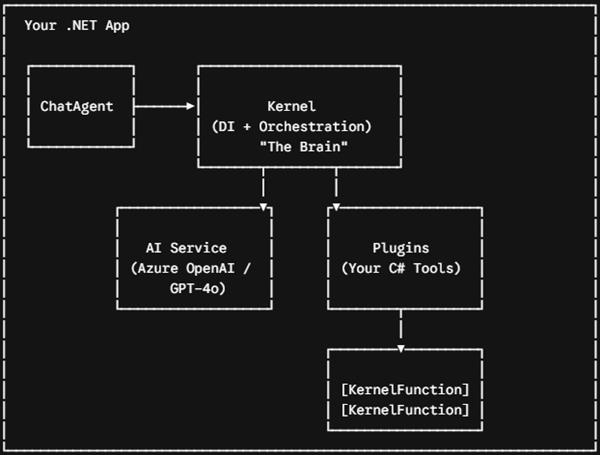
The Kernel
The
Kernelis the central DI container. It holds AI services, plugins, filters, and telemetry. You configure it once at startup and inject it throughout your app — just likeIServiceCollection.Plugins
A plugin is a plain C# class whose public methods are decorated with
[KernelFunction]and[Description]attributes. Semantic Kernel uses reflection to generate a JSON schema for each function and sends it to the LLM. The LLM never calls your code directly — it outputs a structured request, SK intercepts it, invokes your method, and feeds the result back into the conversation.Agents
A
ChatCompletionAgentwraps a Kernel with a system prompt (instructions) and a model. It manages the conversation loop: receive user message → call LLM → handle tool calls → return response. You can orchestrate multiple agents in a group chat for complex workflows.Step-by-step: build your first AI agent in .NET
Step 1 — Install NuGet packages
# Core Semantic Kernel package
dotnet add package Microsoft.SemanticKernel

# Agent framework (ChatCompletionAgent, AgentGroupChat)
dotnet add package Microsoft.SemanticKernel.Agents.Core

# Azure OpenAI connector (or use Microsoft.SemanticKernel.Connectors.OpenAI)
dotnet add package Microsoft.SemanticKernel.Connectors.AzureOpenAIbash
Step 2 — Set up the Kernel with DI
In
Program.cs, register the Kernel as a service using the builder pattern. This integrates naturally with ASP.NET Core's dependency injection:using Microsoft.SemanticKernel; using Microsoft.SemanticKernel.Agents; var builder = WebApplication.CreateBuilder(args); // Register Semantic Kernel with Azure OpenAI builder.Services.AddKernel() .AddAzureOpenAIChatCompletion( deploymentName: builder.Configuration["AzureOpenAI:Deployment"]!, endpoint: builder.Configuration["AzureOpenAI:Endpoint"]!, apiKey: builder.Configuration["AzureOpenAI:ApiKey"]! ); // Register your plugins as services — DI works inside plugins too builder.Services.AddScoped<OrderPlugin>(); builder.Services.AddScoped<InventoryPlugin>(); var app = builder.Build();Pro tip — use OpenAI if you don't have AzureSwapAddAzureOpenAIChatCompletionforAddOpenAIChatCompletion("gpt-4o", apiKey). SK is model-agnostic — you can even point it at a local Ollama instance withAddOllamaChatCompletion.Step 3 — Create a plugin (the agent's tools)
This is where your business logic lives. Each public method with
[KernelFunction]becomes a tool the LLM can call. The[Description]text is what the AI reads to decide when to invoke the function — write it clearly:OrderPlugin.cs
CustomerSupportAgentService.csusing System.ComponentModel;
using Microsoft.SemanticKernel;

public class OrderPlugin
{
    private readonly IOrderRepository _orders;

    // Constructor injection works just like any .NET service
    public OrderPlugin(IOrderRepository orders) => _orders = orders;

    [KernelFunction]
    [Description("Get the current status of a customer order by order ID. "
               + "Returns status, estimated delivery, and line items.")]
    public async Task<string> GetOrderStatusAsync(
        [Description("The unique order identifier, e.g. ORD-12345")]
        string orderId)
    {
        var order = await _orders.GetByIdAsync(orderId);
        if (order is null)
            return $"Order {orderId} not found.";

        return $"""
            Order: {order.Id}
            Status: {order.Status}
            Estimated delivery: {order.EstimatedDelivery:MMM dd, yyyy}
            Items: {string.Join(", ", order.Items.Select(i => i.Name))}
            """;
    }

    [KernelFunction]
    [Description("Cancel an order. Only works if the order has not shipped yet.")]
    public async Task<string> CancelOrderAsync(
        [Description("The order ID to cancel")] string orderId,
        [Description("Reason for cancellation")]  string reason)
    {
        var result = await _orders.CancelAsync(orderId, reason);
        return result.Success
            ? $"Order {orderId} cancelled. Refund will be issued within 3-5 days."
            : $"Cannot cancel {orderId}: {result.Error}";
    }
}
Step 4 — Create the agent and run it
Now wire everything together. The agent gets a system prompt (its instructions), a Kernel with plugins attached, and automatic function-calling enabled:
using Microsoft.SemanticKernel; using Microsoft.SemanticKernel.Agents; using Microsoft.SemanticKernel.ChatCompletion; using Microsoft.SemanticKernel.Connectors.OpenAI; public class CustomerSupportAgentService { private readonly Kernel _kernel; public CustomerSupportAgentService(Kernel kernel, OrderPlugin orderPlugin) { // Clone kernel to avoid polluting the shared instance _kernel = kernel.Clone(); _kernel.ImportPluginFromObject(orderPlugin); } public async Task<string> HandleAsync(string userMessage) { var agent = new ChatCompletionAgent { Name = "SupportAgent", Instructions = """ You are a helpful customer support agent for VoidShop. Use the available tools to look up and manage orders. Always confirm before cancelling an order. Be concise, friendly, and accurate. """, Kernel = _kernel, // Auto = let the LLM decide when to call functions Arguments = new KernelArguments( new OpenAIPromptExecutionSettings { FunctionChoiceBehavior = FunctionChoiceBehavior.Auto() }) }; var chat = new ChatHistory(); chat.AddUserMessage(userMessage); var sb = new StringBuilder(); await foreach (var chunk in agent.InvokeStreamingAsync(chat)) sb.Append(chunk.Content); return sb.ToString(); } }Always clone the kernel for agent-scoped pluginsCallkernel.Clone()before importing plugins into an agent's kernel. This prevents one agent's plugins from leaking into another in multi-agent scenarios — a subtle but critical bug source.Understanding this cycle will help you debug agents and design better plugins:
- User sends a message. Your code adds it to
ChatHistoryand invokes the agent. - SK builds the prompt. All function schemas (generated from your
[KernelFunction]attributes via reflection) are serialised to JSON and included in the API request alongside the user message and chat history. - LLM decides to call a function. Instead of replying in text, the model outputs a structured JSON object:
{"name":"GetOrderStatus","arguments":{"orderId":"ORD-12345"}}. - SK intercepts and invokes your method. It deserialises the arguments, calls
GetOrderStatusAsync("ORD-12345"), and captures the return value. - Result fed back to the LLM. SK adds the function result as a
toolmessage in the conversation and calls the LLM again. - LLM generates the final reply. With the real data now in context, the model produces a natural-language response to the user.
This loop can repeat multiple times in a single user turn — the LLM might call three tools sequentially before it has enough information to reply.
🤝Multi-agent orchestration with AgentGroupChat
Real-world workflows often need multiple specialist agents collaborating. For example: a Triage Agent that classifies the request, a Support Agent that handles order queries, and a Billing Agent that resolves payment issues. Semantic Kernel's
AgentGroupChathandles this:Multi-agent chat
using Microsoft.SemanticKernel.Agents;
using Microsoft.SemanticKernel.Agents.Chat;

// Create specialist agents
ChatCompletionAgent triageAgent = new()
{
    Name         = "TriageAgent",
    Instructions = "Classify incoming requests as: Order, Billing, or Technical. "
                 + "Reply with just the category and a one-sentence summary.",
    Kernel       = kernel.Clone()
};

ChatCompletionAgent orderAgent = new()
{
    Name         = "OrderAgent",
    Instructions = "Handle all order-related queries using the order tools available.",
    Kernel       = orderKernel // kernel with OrderPlugin
};

// Selection strategy: TriageAgent always goes first, then the relevant specialist
var groupChat = new AgentGroupChat(triageAgent, orderAgent)
{
    ExecutionSettings = new AgentGroupChatSettings
    {
        SelectionStrategy = new SequentialSelectionStrategy(),
        TerminationStrategy = new KernelFunctionTerminationStrategy(
            terminationFunction: terminateFn, kernel: kernel)
        {
            MaximumIterations = 6
        }
    }
};

groupChat.AddChatMessage(new ChatMessageContent(
    AuthorRole.User, "My order ORD-99123 hasn't arrived yet, it's been 3 weeks!"));

await foreach (var response in groupChat.InvokeAsync())
    Console.WriteLine($"[{response.AuthorName}]: {response.Content}");
🔌MCP integration — connect to external tools
One of the biggest additions in 2026 is first-class Model Context Protocol (MCP) support. MCP is an open standard that lets your agent consume tools from any MCP server — GitHub, databases, file systems, third-party SaaS APIs — without writing custom plugins.
MCP plugin import
using Microsoft.SemanticKernel.Plugins.MCP; // Import an MCP server's tools as a Semantic Kernel plugin var mcpPlugin = await KernelPluginFactory.CreateFromMcpServerAsync( serverUri: new Uri("http://localhost:5010"), // your MCP server pluginName: "GitHubTools" ); kernel.Plugins.Add(mcpPlugin); // The agent can now call GitHub tools like list_issues, create_pr, etc. // No extra code required — it just works!C# — MCP plugin importExpose your own kernel as an MCP serverYou can also run your Semantic Kernel instance as an MCP server, making your plugins accessible to other AI tools:kernel.AsMcpServer(serverName: "MyApp"). This is how enterprises build composable AI ecosystems.🔒Production concerns: filters, telemetry, and safety
Kernel filters — middleware for AI calls
Filters are SK's equivalent of ASP.NET Core middleware — they intercept function invocations and prompt renders. Use them for logging, caching, PII scrubbing, or rate-limit enforcement:
Kernel filter
public class LoggingFunctionFilter : IFunctionInvocationFilter
{
    private readonly ILogger _logger;
    public LoggingFunctionFilter(ILogger<LoggingFunctionFilter> logger)
        => _logger = logger;

    public async Task OnFunctionInvocationAsync(
        FunctionInvocationContext ctx, Func<FunctionInvocationContext, Task> next)
    {
        _logger.LogInformation("Agent calling: {Plugin}.{Function}",
            ctx.Function.PluginName, ctx.Function.Name);

        await next(ctx);

        _logger.LogInformation("Result: {Result}",
            ctx.Result?.GetValue<string>());
    }
}

// Register the filter
builder.Services.AddSingleton<IFunctionInvocationFilter, LoggingFunctionFilter>();
OpenTelemetry — observing your agent in production
SK emits OpenTelemetry traces and metrics out of the box. Hook it up to Azure Monitor, Jaeger, or any OTLP-compatible backend:
OpenTelemetry setup
builder.Services.AddOpenTelemetry()
    .WithTracing(tracing => tracing
        .AddSource("Microsoft.SemanticKernel*")
        .AddAzureMonitorTraceExporter())
    .WithMetrics(metrics => metrics
        .AddMeter("Microsoft.SemanticKernel*")
        .AddAzureMonitorMetricExporter());
⚡ Best practices for production AI agents
- Write crystal-clear function descriptions. The LLM reads your
[Description]text to decide when to call a function. Vague descriptions lead to wrong function calls or missed calls. Describe when to use the function, not just what it does. - Keep plugins small and focused. A plugin with 15 functions confuses the model and wastes tokens. Group 3–7 related functions per plugin. If the LLM keeps choosing the wrong function, split the plugin.
- Set
MaximumAutoInvokeAttempts. Prevent infinite tool-call loops withFunctionChoiceBehavior.Auto(autoInvoke: true, maximumAutoInvoke: 5). - Use
CancellationTokeneverywhere. Pass tokens through all async plugin methods so agent calls can be cleanly cancelled on HTTP request abort. - Never trust agent output for security decisions. Always validate plugin inputs server-side. A prompt-injected user could try to manipulate the agent into calling destructive functions.
- Prefer structured return types. Return typed objects (serialised to JSON) rather than free-text strings from plugins. This reduces hallucinations caused by ambiguous tool results.
- Test plugins independently. Unit-test your plugin methods just like any service — they're plain C# classes. Don't test them only via the agent loop.
🗺️ Semantic Kernel vs Microsoft Agent Framework: which to use?
Scenario Use Semantic Kernel Use Agent Framework (MAF) Simple single-turn AI features ✅ Ideal Overkill Multi-turn chat agent with tools ✅ Fine (SK Agents) ✅ Preferred going forward Multiple collaborating agents ⚠️ Limited ✅ Built for this Long-running / human-in-the-loop ❌ Not designed for it ✅ Session-based state management Existing SK codebase ✅ Keep it running ✅ Migrate when you need new features New project started today Use SK packages as foundation ✅ Target MAF 1.0 APIs directly 🎯 Real-world use cases worth building
- Customer support agent — connects to CRM, order management, and knowledge base. Routes complex issues to human agents when confidence is low.
- Internal IT helpdesk bot — queries Active Directory, resets passwords, escalates tickets to ServiceNow — all via plugin function calls.
- Code review assistant — integrates with GitHub via MCP, reads PR diffs, runs static analysis tools, and posts structured review comments.
- Document intelligence pipeline — RAG agent that chunks documents into Azure AI Search, retrieves relevant context, and generates summaries or answers grounded in real data.
- DevOps incident responder — monitors alerts, queries logs and metrics, suggests remediation steps, and can trigger runbooks automatically.
Wrapping up
Microsoft Semantic Kernel gives .NET developers a first-class, production-grade path to building AI agents without leaving the C# ecosystem. The plugin model maps cleanly onto patterns you already know — DI, interfaces, attributes — making it accessible without sacrificing power.
The evolution to Microsoft Agent Framework 1.0 in April 2026 cements this as the strategic direction for agentic .NET applications: stable APIs, long-term support, multi-agent graph orchestration, and native MCP interoperability. If you start building agents in .NET today, Semantic Kernel is where you start — and Agent Framework is where you grow.
Further readingOfficial docs:learn.microsoft.com/semantic-kernel| MAF blog:devblogs.microsoft.com/semantic-kernel| GitHub:github.com/microsoft/semantic-kernel| MAF overview:learn.microsoft.com/agent-framework
 Tutorial
How to Create Model Context Protocol (MCP) Server in C# and Run in VS Code
 Tutorial
How to Use Image Into Prompts in Google Gemini AI
 Tutorial
How to Integrate DeepSeek AI in ASP.NET Core Web API (Step-by-Step Guide)
 Tutorial
What is Snowflake and layers of Snowflake
Comments

|
|
| Follow up comments |
| {{e.Name}} {{e.Comments}} |
{{e.days}} | |
|
|
||
|
|
||
| {{r.Name}} {{r.Comments}} |
{{r.days}} | |
|
|
||